
Dynamic Ruler Options
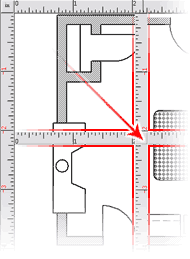
The rulers can make for easy and fast designing of your next project. CAD Pro’s dynamic ruler options allows you to re-position your starting point with a simple drag-and-drop of the page rulers! Just grab the corner box of the rulers, drag them anywhere on the page, and double-click. You’re done!
CAD Pro uses a 32bit floating-point database for the dynamic ruler options. As such, floating-point processing yields much greater precision than fixed-point processing, distinguishing floating-point software as the ideal DSP (Digital Signal Processing) when computational accuracy is a critical requirement.
Intelligent Mouse Wheel Scrolling
CAD Pro Software allows for convenient document panning and scrolling by hovering the mouse cursor over the vertical or horizontal rulers while rolling the mouse wheel.
Relocatable Rulers!
Just like using a real set of T-squares, drag the CAD Pro rulers anywhere on the page. Now you can draw with precision.
Ruler Options
Setup your rulers to be Imperial Measurements or Metric, this allows you international flexibility. You can also set the number of divisions your rulers display. This makes for fast and easy designing.
You also have the choice within the Rulers dialog box to rescale previous drawn objects, therefore saving you time and money.
CAD Pro is your #1 source for home design software; providing you with the many features needed to design your perfect layouts and designs! Looking to design your own home, building, restaurant or electrical diagrams? Check out our dynamic ruler options, floor plans, restaurant design and more! For more information concerning our dynamic rulers and CAD Pro’s vast array of features, please feel free to contact us.
Cad Pro is also great for creating net-zero floor plans, commercial floor plans, building floor plans, facility plans, construction details, restaurant drawings and much more.
CAD Pro has helped thousands of homeowners, professional designers, builders, and contractors plan and design all types of floor plans. CAD Pro is used by NARI professional remodelers and contractors and the NRCA roofing contractors. CAD Pro is also used by NHBA home builders and contractors as well as the NALP National Association of Landscape Professionals.