
Dimension Tools with Snap Features
Dimension Tools with Precise Alignment
Dimension tools combined with precise snap tools produce accurate designs. While you are creating your designs, CAD Pro’s Snap tools are designed to automatically align or locate tangents, perpendiculars, parallels, object centers, intersections and much more. Precision drafting is automatic and simple when using the Dimension tools. Snap tools offer you the power of endless precision for today’s computer drafting needs. Users can quickly access the Snap tools with a single mouse click and relocate the tools to any location on your screen for added convenience.

Precision Dimension
Precision is no problem when using CAD Pro Software, because all operations of your design process maintain floating point precision. Dimensioning of your designs is an essential requirement when bringing your ideas to reality. That’s why CAD Pro offers this full range of tools to assist you in precisely building your design.

CAD Pro Accuracy
CAD Pro uses a 32bit floating-point database. As such, floating-point processing yields much greater precision than fixed-point processing, distinguishing floating-point software as the ideal DSP (Digital Signal Processing) when computational accuracy is a critical requirement.
Control Your Design
With these easy to use and powerful dimension tools, you maintain full control of your design requirements.
Cross-Platform Solution
CAD Pro Software is the ultimate cross-platform solution for any type of computer drafting needs you may have.
Automatic & Associative Dimension Tools:
- Linear Dimensioning
- Parallel Dimensioning
- Angular Dimensioning
- Diameter
- Radius
- Auto Leader Lines
Associative Dimension Tools
The power of associative dimensioning allows you to re-size or edit your designs and dimensions will automatically update to reflect your changes.
Complete Font Support
Complete support for all of your fonts, font sizes and styles allows you to customize your designs with ease.
Automatic Displays
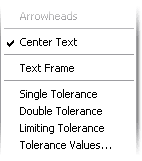
CAD Pro automatically displays text frames, single, double and limiting tolerance values for added precision.
Easy to Use Enhancements
CAD Pro delivers compelling enhancements, with extreme ease of use when working with all of the dimension tools.
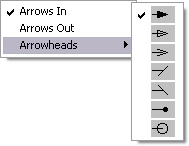
When dimensioning, select from a wide range of arrowheads…
…as well as other display options
Cad Pro is also great for creating net-zero floor plans, commercial floor plans, building floor plans, facility plans, construction details, restaurant drawings and much more.
CAD Pro has helped thousands of homeowners, professional designers, builders, and contractors plan and design all types of floor plans. CAD Pro is used by NARI professional remodelers and contractors and the NRCA roofing contractors. CAD Pro is also used by NHBA home builders and contractors as well as the NALP National Association of Landscape Professionals.