
Streamline Your Drafting Projects With CAD Pro
CAD Pro vs AutoCAD
CAD Pro
AutoCAD
- Less than $100
- Easy to learn and use
- One purchase provides the complete program
- Easy upgrades
VERSUS
- Very expensive
- Difficult and hard to learn
- Have to purchase many modules to have full program
- Expensive upgrades
Great reasons to purchase CAD Pro instead of AutoCad.
- Why pay thousands of dollars for AutoCAD, when you can buy CAD Pro for considerably less money.
- Auto CAD requires expensive and time consuming training.
- AutoCAD’s interface is difficult and hard to learn.
- AutoCAD requires that you purchase many different modules to get a complete program.
- AutoCAD drafting requires expensive upgrades.
- CAD Pro can import AutoCAD files so that you may modify them to fit your requirements.
CAD Pro is the perfect patent drafting software!
CAD Pro is excellent for preparing very detailed blueprints for any type of patent design without the expense of AutoCAD.
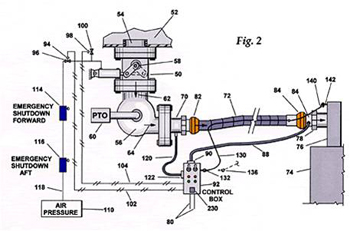
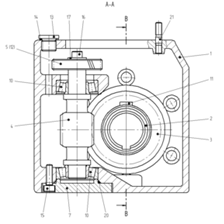
Save Designs as a PDF!
Save any CAD Pro documents as a PDF file, this will allow you to quickly communicate your ideas with friends, family and contractors! AutoCAD will charge you extra for this feature.
English or Metric CAD Software!
CAD software from CAD Pro fully supports English or Metric coordinates. Design and create blueprints of any kind with easy to use CAD software from CAD Pro!
Creating Blueprints
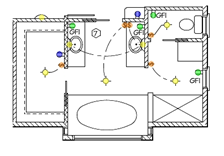
CAD Pro is an excellent software program for preparing very detailed blueprints. Anyone can create blueprints when using the wide variety of design tools found in CAD Pro instead of AutoCAD. CAD Pro’s blueprint software and smart tools help you create perfect blueprints for house plans, deck designs, mechanical drawings, landscape blueprints and much more in just a few minutes. AutoCAD requires training and takes much longer.
Dimensions and Tolerances
Smart and accurate dimensioning with CAD Pro’s blueprint software is fast and easy, while AutoCAD is difficult and requires training. When creating blueprints that require precise dimensions, let CAD Pro take the work out of the process. CAD Pro’s “Smart Dimensioning” tools will automatically create all your blueprint dimensions with a few simple clicks. Compare AutoCAD prices with CAD Pro.
Sketch Tracing
Sketch any drawings on a piece of paper, and then scan it. Now open your scanned drawing in CAD Pro and it becomes a traceable template that you can easily modify when creating your blueprints. A feature that AutoCAD does not offer. CAD Pro can import AutoCAD files so that you may modify them to fit your requirements.
Blueprint Symbols
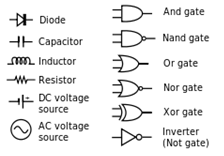
Common symbols and their proper use can assist you in the creation process of your blueprints. CAD Pro does include a variety of pre-drawn symbols which save time and money when creating your blueprints. CAD Pro allows you to create any type of blueprint symbols you may require and then save them as a symbol for future use. AutoCAD users have to purchase these symbols.
Key features include:
- Smart Tools
- Auto Shapes
- Free templates
- Advanced Drafting Tools
- Customizable Views
- Over 5,000 FREE Symbols
- Up to 16.8 Million Colors
- Keyboard entry options
- Associative Dimensioning
- Single and double tolerances
- Rotating Text
- 256 Layers
- Grid Tools with Snap Grids options
- Save any CAD Pro file as a PDF
- Import AutoCAD DXF R12, 13, 14 & 2000
- English or Metric Coordinates
- Automatic Snap Tools for Precise Alignment
- Fill Colors & Patterns