
CAD Pro is great for Mechanical Drawings!
Mechanical drawings with software from Cad Pro includes all the functionality of more expensive competitors, plus comprehensive libraries and tools for automating common mechanical drawing tasks.
CAD Pro is excellent for preparing very detailed computer drafting projects such as; mechanical drawings of all types.
Quickly add your mechanical symbols, connect them using Cad Pro’s automated snap tools for perfect alignment, and see your vision turn into a professional looking mechanical drawing that is ready to be printed, shared online, or exported to Microsoft Office® or PDF with a single-click.
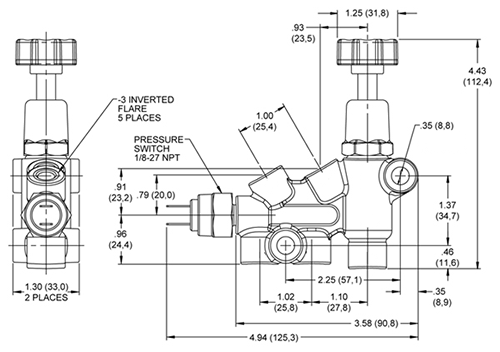
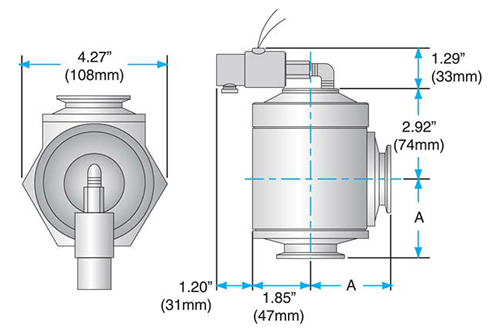
Cad Pro helps you align and arrange everything perfectly. Cad Pro’s smart tools assist in precise alignment of your components even when you move them around.
Mechanical Symbols for Mechanical Drawings!

Common mechanical symbols and their proper use can assist you in the creation process of your mechanical drawings. CAD Pro includes a variety of pre-drawn mechanical symbols which save time and money when creating your mechanical drawings.
If needed you can quickly create your own mechanical symbols save them as a mechanical symbol for future use. Also, create Custom Clipboard Files which contain your custom mechanical symbols!
Important types of mechanical drawings include:
- General Arrangement drawings
- Detail drawings
- Fabrication drawings
- Assembly drawings
- Arrangement Drawings
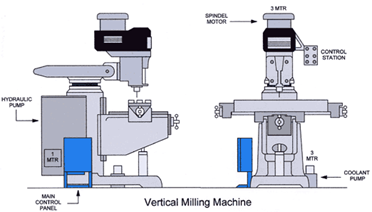
Mechanical Drawings for patent designs!
Cad Pro drawings can be presented to a patent attorney or patent agent. This allows them to quickly review your mechanical drawings and gain an accurate understanding of your patent submission or invention. Your detailed drawings created with CAD Pro, will save a lot of expensive time for your patent attorney.
Sketch Tracing
Sketch your drawings on a piece of paper, and then scan it. Now open your scanned drawing in CAD Pro and it becomes a traceable template that you can easily modify.
Easy to Use Photo Tracing Software
Simply open up your mechanical drawing photos from any smartphone or digital camera and trace over them with CAD Pro’s easy-to-use design tools.
Smart dimensions for added precision!
When creating mechanical drawings or mechanical blueprints that require precise dimensions, let CAD Pro take the work out of the process. CAD Pro’s “Smart Dimensioning” tools will automatically create all your mechanical drawing dimensions with a few simple clicks.
Save your drawings as a PDF file!
Save your CAD Pro drawings as a PDF file, this will allow you to quickly communicate your mechanical design ideas with friends, family, engineers and patent consultants. Great when submitting your invention to the Patent Office.
CAD Pro is also used for:
- Office Floor Plans
- Deck Plans
- Shop Plans
- Restaurant Floor Plans
- Detatched Garage Plans
- Kitchen Remodeling
- Home Office Layouts
- Outdoor Kitchens
- Master Bath Floor Plans
- Landscape Designs
- Restaurant Design Ideas
- Doll Houses
- Home Floor Plans
- Furniture Designs
- Bathroom Remodeling
- Kitchen Floor Plans
- Sunrooms
- Covered Patios